
Import Bank Statements into QuickBooks Desktop
Convert CSV, Excel, OFX, QBO, QFX, and TXT files into IIF format that QuickBooks Desktop can import — in minutes, not hours.
Supports all major bank statement formats


Stop doing manual data entry
You love the classic QuickBooks Desktop. But importing bank transactions shouldn't mean hours of tedious typing. QuickConverter bridges the gap — giving you the power to import modern bank files directly into the QuickBooks version you know and trust.
- No spreadsheet formatting required
- Works even with expired QuickBooks versions
- Bank Feeds disabled? No problem.
- Desktop-only web app with a familiar interface
How It Works
Three simple steps to get your bank transactions into QuickBooks Desktop
Upload Your File
Drag and drop your CSV, OFX, QBO, QFX, or TXT bank statement. Our CSV Editor helps you map columns if needed.
Review & Edit
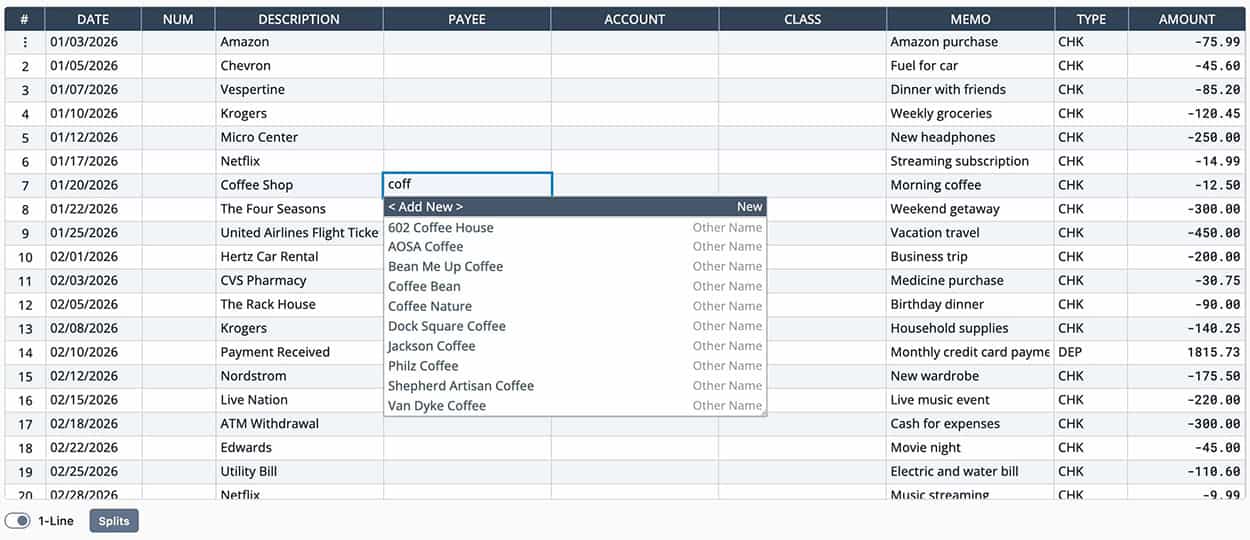
Use the Transaction Editor to review, split, and categorize transactions. Apply Match Rules to speed things up.
Export to IIF
Download your transactions as an IIF file and import directly into QuickBooks Desktop in seconds.
Everything You Need
A powerful set of tools designed to feel familiar to QuickBooks Desktop users
Smart CSV Import
No need to format your spreadsheet perfectly. Map columns, combine descriptions, and handle messy data with ease.
Split Transactions
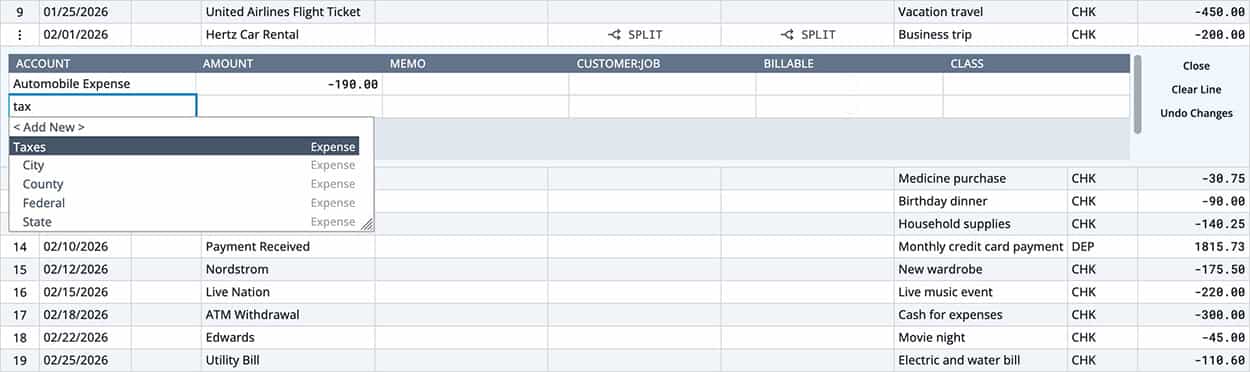
Split transactions directly in the editor. Add Memo, Customer:Job, Class, and mark items as billable.
Match Rules
Automate repetitive categorization. Create rules based on payees, amounts, or descriptions and apply them in bulk.
Duplicate Handling
Copy, paste, clear, or skip individual transactions with just a couple of clicks. Handle thousands of rows effortlessly.
Large File Support
Process thousands of entries directly in your browser. No server uploads required — your data stays private.
Privacy First
All processing happens client-side in your browser, so your financial data never leaves your computer. Every saved name is encrypted, and we keep so little on our servers there is hardly anything to protect.
Split Transactions in the editor
Convert bank statements into QuickBooks format
Skip the manual data entry. Take your transactions from your bank account straight into QuickBooks with an interface that feels familiar to any experienced QuickBooks user.
Customer Payments
Import customer payments seamlessly into QuickBooks, and apply to invoices automatically. Just set the transaction account as Accounts Receivable and the payee to customer.
Vendor Bills & Payments
Handle vendor bills, bill payments, and credit card charges. Set a transaction to Accounts Payable and payee to any vendor.
Bank Transfers
Record transfers between accounts with proper categorization.
Update transactions in bulk
Take the headache out of repetitive manual entry by applying match rules to entire statements. Match Rules are easy to adjust and customize for many transaction possibilities.
Automatically create rules based on your existing payees, like customers, vendors, employees, and other names. Save hours every month.
Try Match RulesNever import the same transaction twice
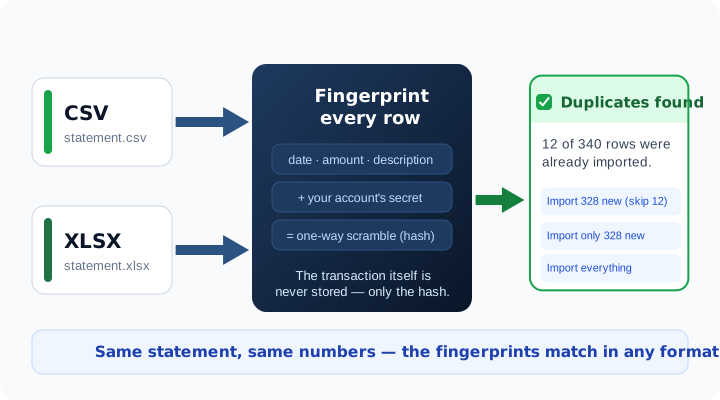
A double import quietly doubles your income — and wrecks your reconciliation. QuickConverter remembers anonymous fingerprints of the rows you already imported and warns you before an overlap reaches your books, even when the same statement comes back as a different file format.
- Catches the same statement in CSV, Excel, OFX, or QBO
- Your transactions are never stored — only unreadable fingerprints
- You choose: skip duplicates, import only new rows, or import everything
See QuickConverter in Action
Watch how easy it is to import your bank statements into QuickBooks Desktop in just a few clicks.
Trusted by Business Owners & Accountants
Join thousands who rely on QuickConverter to keep their books accurate and up to date.
What Our Customers Say
“QuickConverter saved me at least 6 hours of manual data entry every month. The Match Rules feature alone is worth it — my recurring transactions are categorized automatically.”
“I was stuck with an old version of QuickBooks and no bank feed support. This app let me import all my transactions in minutes. Absolutely game-changing for my workflow.”
“As a CPA, I need tools that are reliable and accurate. QuickConverter handles everything my clients throw at it — CSVs, OFX files, you name it. Highly recommended.”
Works With Your QuickBooks Desktop
Whether you are running the latest version or holding onto a trusty old copy, QuickConverter has you covered.
QuickBooks 2007–2024
Compatible with every desktop version from 2007 through 2024.
Expired Versions
Keep using the QuickBooks you are familiar with, even after support ends.
No Bank Feeds?
Import directly via IIF — no Bank Feeds or online services required.
Five locks between your books and everyone else
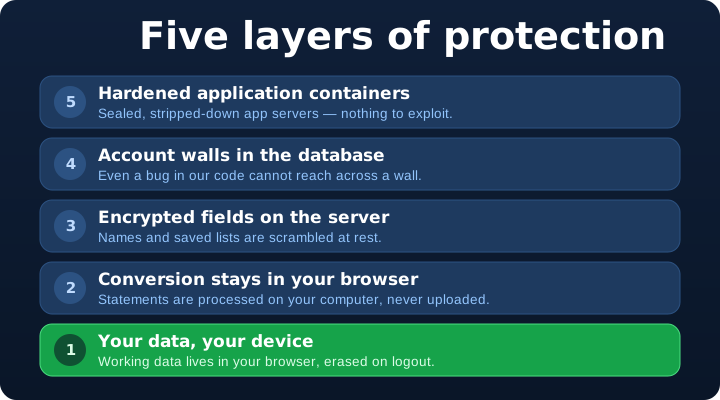
Your statements are processed by your own browser and never uploaded. Saved names are encrypted with AES-256. Each account is walled off in the database itself. We collect so little that there is simply not much to protect — by design.
- Statements never leave your computer
- AES-256 encryption on your device and our servers
- Delete everything yourself, any time — no support ticket
Let our app handle your CSV
You do not need to format your CSV perfectly before uploading. QuickConverter helps you make sense of your data in minutes.
Header Row Detection
Automatically detect and select the correct header row in your spreadsheet.
Extended Descriptions
Combine multiple description columns (like Venmo statements) into a single field.
Direct Fill
Already have payee, account, and class in your CSV? Convert directly to IIF.
Column-to-Splits
Turn fee breakdown columns into split transactions automatically.
Large Files
Process thousands of entries directly in your browser without slowdown.
Modify Any Field
Adjust any field you want, including imported data, before exporting.
Ready to save hours of manual entry?
Join busy business owners and seasoned CPAs who use QuickConverter to import bank transactions into QuickBooks Desktop — fast, easy, and free to try.
Get Started NowFree to try. No credit card required.