Your books are your livelihood.We guard them like it.
QuickConverter moves your bank statement data into QuickBooks Desktop without ever asking you to hand over the statements themselves. Here is exactly what we protect, how we protect it, and what we deliberately never collect.
Five locks on the door
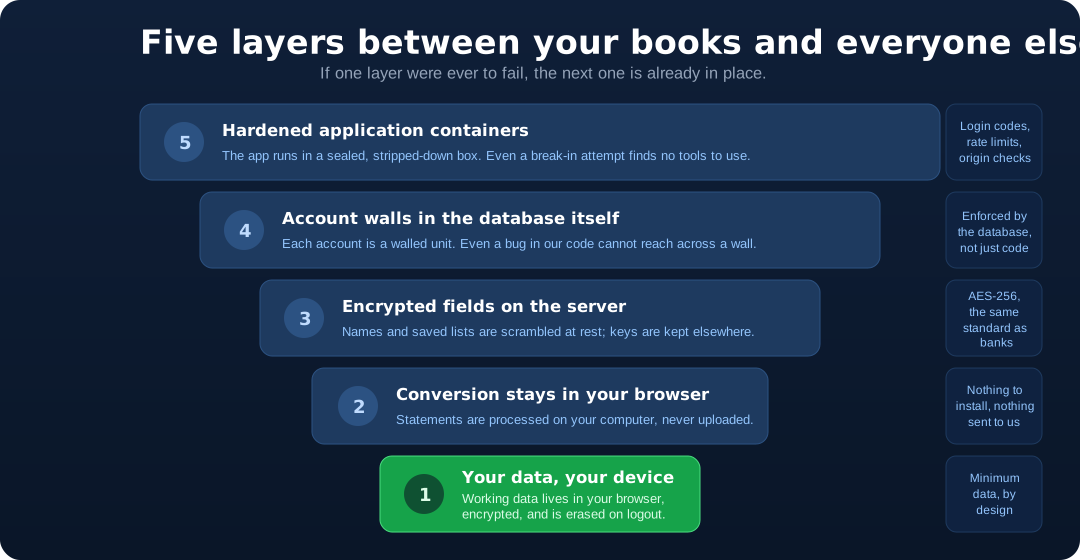
Security engineers call this “defense in depth”: several independent protections, arranged so that no single failure ever exposes your data. Here are the five, in plain words.
What each layer actually does
No jargon, no fine print — the same protections as above, each described the way you might explain it to a colleague.
Nothing to install, nothing to hand over
The converter does its computing inside your browser tab. A bank file goes from your disk, through your browser, to the export file — without a round trip through our servers.
Walls built into the database
Every record belongs to exactly one account, and the database itself refuses to serve a row to any other account — even if application code were to ask wrongly. Accountants call this segregation of duties; engineers call it row-level security.
Encrypted in transit, at rest, and on your device
Traffic runs over TLS. Saved names and lists are scrambled with AES-256 before storage, with the keys held outside the database. The working copy in your browser is encrypted with a key only your session holds.
Sign-ins that resist guessing
You sign in with a one-time code or a trusted provider like Google. Behind the scenes: strict origin checks, brute-force rate limits shared across our whole infrastructure, and short-lived session cookies.
A stripped-down place to run
The app runs in a minimal, read-only container with its own non-root user and no spare tools inside. Fewer moving parts mean fewer places for trouble to hide.
Data minimization, by design
The strongest protection for data you would rather not share is not collecting it. We never ask for bank credentials, and list imports discard tax IDs and account numbers automatically.
What we keep — and what we never touch
The best way to protect information is not to hold it in the first place. This is the complete list, in both directions.
- Your email address — your login identity
- Saved account, payee, and class names you choose to keep — encrypted with AES-256
- Anonymous duplicate fingerprints — one-way scrambles that cannot be turned back into transactions
- Your billing status from Stripe, and the card brand and last-4 digits on receipts
- Page-view counts from our cookieless, self-hosted analytics
Each item is the minimum needed to run the feature it supports — nothing extra.
- Your bank statements — they stay on your computer and are processed by your browser
- Your transactions after import — nothing readable is kept on our servers
- Bank account or routing numbers — discarded automatically on list imports
- Social Security and tax ID numbers — likewise never stored
- Bank login credentials, balances, or copies of identity documents — we never ask
If a data category is not on the first list, we do not have it — that is the whole point of the design.
Questions accountants actually ask
Does QuickConverter see my bank transactions?
No. Your statements are read and converted by your own web browser, on your own computer. They are never uploaded to our servers — not during import, not during editing, not during export. The IIF file you bring into QuickBooks is created on your computer too.
Can employees of QuickConverter read my data?
The little we store is scrambled (encrypted) before it touches the database, and the scrambling keys are stored separately from the data. On top of that, the database itself only releases rows to the account that owns them — a technique borrowed from large enterprise systems. A forgotten filter in the code would return nothing, not another customer’s data.
What exactly is stored on your servers?
The short list: your email address, the account/payee/class names you choose to save (encrypted), anonymous fingerprints that let us warn you about duplicates (unreadable one-way scrambles), your billing status, and privacy-friendly page-view counts. No statements. No transactions. No bank account numbers.
What happens on my computer when I use the app?
While you work, your transactions are kept in your browser’s own database, encrypted with a key only your signed-in session holds. Logging out erases it. Clearing your browser data erases it. Deleting your account erases it. You can also open the file manager and remove any file’s history yourself.
Where is my data hosted?
On servers we lease in Vultr’s Los Angeles data center, behind Cloudflare. Data does not leave the United States. Payments are handled entirely by Stripe — we never see your card number — and sign-in emails are delivered by Microsoft Azure.
How do I delete everything?
Sign in, open Account → Delete Account, and confirm. Your account and every server-side record tied to it are erased, and your browser-stored data is wiped at the same time. No support ticket required.
The legal, complete version of all of this lives in our Privacy Policy.
Ready to convert, without giving up your data?
Everything above is already in place — you just use the app. Import a statement, review it, export an IIF file, and your statements never leave your computer.
Try It FreeFree to try. No credit card required.