
Date Format for CSV to QuickBooks
Why is Date Format Important?
Who the heck would have thought that dates can be written down in so many ways. It's actually pretty much impossible to automatically catch all formats with one simple import tool like QuickConverter.
There's no reliable way to know if 05/12/2025 is May 12, 2025 or December 5, 2025.
A transaction with with the wrong date format will be rejected from a QuickBooks import.
Read on to understand what QuickBooks accepts and how to use QuickConverter to produce those results reliably.
Date Format QuickBooks Uses
Looking at QuickBooks you can see the dates are printed numerically in the following order, Month, Day, Year.
QuickBooks will only accept it in that order with the following separators: "/", "-", ".", or no separator.
QuickBooks Desktop accepts all of the following:
- MM/DD/YYYY
- MM-DD-YYYY
- MM.DD.YYYY
- MMDDYYYY
- MM/DD/YY
- MM-DD-YY
- MM.DD.YY
- MMDDYY
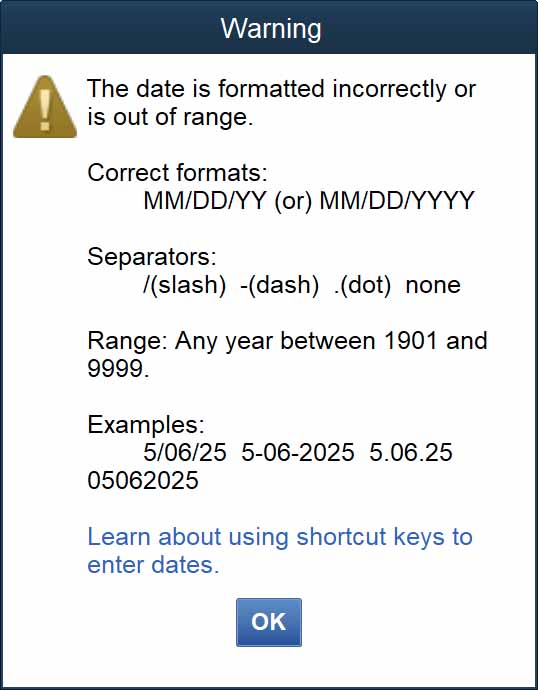
QuickConverter will attempt to produce the first format from your import.
However, like I wrote above, QuickConverter can't tell the difference between DD/MM/YYYY and MM/DD/YYYY.
Date Formats That QuickConverter Accepts
QuickConverter will consistently and accurately parse dates in the ISO 8601 format. Which includes:
- YYYY-MM-DD
- YYYY-MM-DDTHH:mm:ss
- YYYY-MM-DDTHH:mm:ss.sss
The last two have hours, minute, and seconds.
Of course importing dates in short format works:
- MM/DD/YYYY (ex "01/15/2025")
You can also import dates in other formats:
- MMM DD YYYY (ex "Jun 30 2025")
- DD MMM YYYY (ex "16 Mar 2025")
If QuickConverter doesn't recognize the format, it will just use what you entered, just make sure it's a format accepted by QuickBooks Desktop.
But if you're using an international date format, like DD/MM/YYYY or DD-MM-YYYY you'll need to change it to one of the accepted formats above before importing.
There are other date formats like YYYYMMDD, where there is no separation between the numbers. OFX files even have their own date format for bank transfers, which are only supported when importing those files.
So that's basically it. Just make sure your CSV has one of the supported date formats.